补充章
本章你将学会什么
Section titled “本章你将学会什么”- 除飞书外,OpenClaw 官方渠道如何按“最小路径”接入;
- 哪些是内置渠道,哪些需要先安装插件;
- 每个渠道最关键的配置项与第一条消息验证动作;
- 一套跨渠道通用的排障顺序。
15.1 使用方式:先选渠道,再照抄最小路径
Section titled “15.1 使用方式:先选渠道,再照抄最小路径”建议按这个顺序执行,避免新手“同时改太多”:
- 先确认第 2 章已跑通(Web UI 可稳定对话);
- 在本章只选 一个 渠道接入,不并行配置;
- 先完成私聊打通,再放开群聊/频道;
- 若报错,先看
openclaw channels status --probe和openclaw logs --follow。
官方群消息通用流程(原图搬运,来源:docs/zh-CN/channels/groups.md):
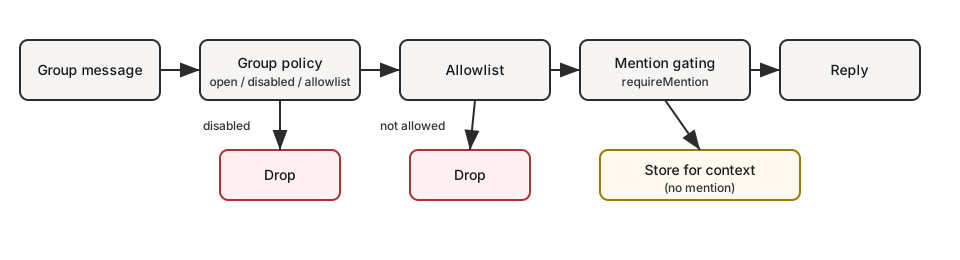
来源:
- https://docs.openclaw.ai/channels/groups
- https://raw.githubusercontent.com/openclaw/openclaw/main/docs/images/groups-flow.svg
15.2 内置渠道(无需额外安装插件)
Section titled “15.2 内置渠道(无需额外安装插件)”15.2.1 Telegram(Bot API)
Section titled “15.2.1 Telegram(Bot API)”- 官方来源:https://docs.openclaw.ai/channels/telegram
- 最小步骤:
- 在
@BotFather创建 bot,保存 token; - 配置
TELEGRAM_BOT_TOKEN或channels.telegram.botToken; - 启动网关并审批首次配对。
- 在
- 最小配置(官方示例):
{ channels: { telegram: { enabled: true, botToken: "123:abc", dmPolicy: "pairing", }, },}15.2.2 WhatsApp(Web / Baileys)
Section titled “15.2.2 WhatsApp(Web / Baileys)”- 官方来源:https://docs.openclaw.ai/channels/whatsapp
- 最小步骤:
- 建议使用独立手机号;
- 配置
channels.whatsapp; - 执行
openclaw channels login --channel whatsapp扫码绑定; - 启动 Gateway,验证私聊收发。
- 最小配置(官方示例):
{ channels: { whatsapp: { dmPolicy: "allowlist", allowFrom: ["+15551234567"], }, },}15.2.3 Discord(Bot API)
Section titled “15.2.3 Discord(Bot API)”- 官方来源:https://docs.openclaw.ai/channels/discord
- 最小步骤(按官方 Quick setup 补齐):
- 打开
https://discord.com/developers/applications,新建应用并创建 Bot; - 在 Bot 页面开启
Message Content Intent(必开); - 若要做成员/角色允许列表,再开启
Server Members Intent; - 复制 Bot Token(
Reset Token后复制); - 在 OAuth2 URL Generator 勾选
bot+applications.commands; - 在 Bot Permissions 至少勾选
View Channels / Send Messages / Read Message History / Embed Links / Attach Files; - 页面底部会出现 Generated URL,点击 Copy 后粘贴到浏览器打开,选择目标服务器,点 Continue + Authorize 完成安装;
- 确认 Bot 已出现在目标服务器成员列表,再继续下一步;
- 在 Discord 客户端打开 Developer Mode,复制
Server ID、Channel ID、User ID(后续做 allowlist 要用); - 先在 OpenClaw 主机写入 token 并启动网关;
- 默认走 Ask Your Agent(你已在前文打通飞书/WebUI):在已有对话渠道里请 Agent 完成 Discord 剩余配置与配对审批。
- 打开
- 建议命令(先配 token,再跑网关):
openclaw config set channels.discord.token '"YOUR_BOT_TOKEN"' --jsonopenclaw config set channels.discord.enabled true --jsonopenclaw gateway restart首次私聊后,默认在已打通渠道里发给 Agent:
我已经在本机配置了 Discord token。请继续完成 Discord 接入,并批准这个 pairing code:
<CODE>。
若你选择手工审批,再执行:
openclaw pairing list discordopenclaw pairing approve discord <CODE>- 最小配置(官方示例):
{ channels: { discord: { enabled: true, token: "YOUR_BOT_TOKEN", }, },}经验提示:如果 Bot 在线但不回消息,先回头检查 Intent 和 Bot Permissions;另外确认你不是只“勾选了权限”却没执行 Generated URL 的浏览器授权安装。
15.2.4 Slack(默认 Socket 模式)
Section titled “15.2.4 Slack(默认 Socket 模式)”- 官方来源:https://docs.openclaw.ai/channels/slack
- 最小步骤(Socket):
- 在 Slack App 开启
Socket Mode; - 在 Slack App 中拿到
xapp-...与xoxb-...; - 配置
channels.slack.appToken与channels.slack.botToken; - 启动 Gateway 并邀请 bot 入频道。
- 在 Slack App 开启
- 最小配置(官方示例):
{ channels: { slack: { enabled: true, appToken: "xapp-...", botToken: "xoxb-...", }, },}15.2.5 Google Chat(Chat API)
Section titled “15.2.5 Google Chat(Chat API)”- 官方来源:https://docs.openclaw.ai/channels/googlechat
- 最小步骤:
- 在 Google Cloud 启用 Chat API;
- 创建 Service Account 并下载 JSON 密钥;
- 在 Google Chat 配置应用与 webhook;
- 在 OpenClaw 配置
serviceAccountFile和 webhook audience; - 启动 Gateway 验证首条消息。
15.2.6 Signal(signal-cli)
Section titled “15.2.6 Signal(signal-cli)”- 官方来源:https://docs.openclaw.ai/channels/signal
- 最小步骤:
- 安装
signal-cli(需要 Java); signal-cli link -n "OpenClaw"绑定设备;- 配置
channels.signal; - 启动 Gateway 验证收发。
- 安装
- 最小配置(官方示例):
{ channels: { signal: { enabled: true, account: "+15551234567", cliPath: "signal-cli", dmPolicy: "pairing", allowFrom: ["+15557654321"], }, },}15.2.7 BlueBubbles(推荐 iMessage 路线)
Section titled “15.2.7 BlueBubbles(推荐 iMessage 路线)”- 官方来源:https://docs.openclaw.ai/channels/bluebubbles
- 最小步骤:
- 在 macOS 安装 BlueBubbles Server 并启用 Web API;
- 配置
serverUrl、password、webhookPath; - 将 BlueBubbles webhook 指向 Gateway;
- 启动 Gateway 后验证私聊收发。
- 最小配置(官方示例):
{ channels: { bluebubbles: { enabled: true, serverUrl: "http://192.168.1.100:1234", password: "example-password", webhookPath: "/bluebubbles-webhook", }, },}15.2.8 iMessage(imsg 旧路线)
Section titled “15.2.8 iMessage(imsg 旧路线)”- 官方来源:https://docs.openclaw.ai/channels/imessage
- 最小步骤:
- Mac 上登录“信息”应用;
- 安装
imsg(示例:brew install steipete/tap/imsg); - 配置
channels.imessage.cliPath与dbPath; - 启动 Gateway 并授权 macOS 自动化权限。
15.2.9 IRC
Section titled “15.2.9 IRC”- 官方来源:https://docs.openclaw.ai/channels/irc
- 说明:截至 2026-02-17,
zh-CN/channels中未提供 IRC 条目,本节依据官方英文页整理。 - 最小步骤:
- 配置
host、port、tls、nick、channels; - 启动或重启 Gateway(文档示例命令为
openclaw gateway run); - 保持默认
dmPolicy: pairing与groupPolicy: allowlist,先打通私聊再放开群聊。
- 配置
15.3 插件渠道(先装插件,再配置)
Section titled “15.3 插件渠道(先装插件,再配置)”先执行通用动作:
openclaw plugins list若目标插件未启用,按渠道安装。
15.3.1 Mattermost
Section titled “15.3.1 Mattermost”openclaw plugins install @openclaw/mattermost最小路径:创建 Mattermost bot → 拿 botToken 与 baseUrl → 写入配置 → 启动 Gateway。
关键配置:channels.mattermost.botToken、channels.mattermost.baseUrl。
15.3.2 Microsoft Teams
Section titled “15.3.2 Microsoft Teams”openclaw plugins install @openclaw/msteams最小路径:装插件 → 建 Azure Bot → 配 appId/appPassword/tenantId → 暴露 /api/messages(默认 3978)→ 启动 Gateway。
关键配置:channels.msteams.appId、appPassword、tenantId、webhook。
15.3.3 LINE
Section titled “15.3.3 LINE”openclaw plugins install @openclaw/line最小路径:LINE Developers 建 Messaging API 应用 → 打开 webhook → 配 token/secret → 启动 Gateway。
关键配置:channels.line.channelAccessToken、channelSecret、webhookPath(默认 /line/webhook)。
15.3.4 Nextcloud Talk
Section titled “15.3.4 Nextcloud Talk”openclaw plugins install @openclaw/nextcloud-talk最小路径:装插件 → 用 occ talk:bot:install 建 bot → 配 baseUrl/botSecret → 启动 Gateway。
关键配置:channels.nextcloud-talk.baseUrl、channels.nextcloud-talk.botSecret。
15.3.5 Matrix
Section titled “15.3.5 Matrix”openclaw plugins install @openclaw/matrix最小路径:装插件 → 准备 Matrix 账号与 accessToken → 配置 homeserver/token → 启动 Gateway。
关键配置:channels.matrix.homeserver、accessToken、(可选)encryption: true。
15.3.6 Nostr
Section titled “15.3.6 Nostr”openclaw plugins install @openclaw/nostr最小路径:装插件 → 生成 nsec 私钥(可用 nak key generate)→ 配 privateKey → 重启 Gateway。
关键配置:channels.nostr.privateKey、relays。
15.3.7 Tlon
Section titled “15.3.7 Tlon”openclaw plugins install @openclaw/tlon最小路径:装插件 → 获取 Urbit ship URL + 登录码 → 配 ship/url/code → 重启 Gateway。
关键配置:channels.tlon.ship、url、code。
15.3.8 Twitch
Section titled “15.3.8 Twitch”openclaw plugins install @openclaw/twitch最小路径:装插件 → 生成 Twitch accessToken + clientId → 配目标频道与访问控制 → 启动 Gateway。
关键配置:channels.twitch.username、channel、accessToken、clientId、allowFrom。
15.3.9 Zalo(Bot API)
Section titled “15.3.9 Zalo(Bot API)”openclaw plugins install @openclaw/zalo最小路径:装插件(若 npm 包不可用,则走本地扩展路径)→ 配 botToken → 重启 Gateway。
关键配置:channels.zalo.botToken(或 tokenFile)。
15.3.10 Zalo Personal(个人号)
Section titled “15.3.10 Zalo Personal(个人号)”openclaw plugins install @openclaw/zalouser最小路径:装插件 → openclaw channels login --channel zalouser 扫码登录 → 启用渠道并重启 Gateway。
关键配置:先确保主机可用 zca-cli,并完成账号映射。
15.4 统一排障顺序(所有渠道通用)
Section titled “15.4 统一排障顺序(所有渠道通用)”按固定顺序排,不要跳步:
- 看插件状态:
openclaw plugins list- 看渠道状态(含探测):
openclaw channels status --probe- 看 Gateway 状态:
openclaw gateway status- 看实时日志:
openclaw logs --follow- 每次只改一个变量(例如只改 token 或只改回调 URL),改完即复测。
15.5 官方文档索引(除飞书)
Section titled “15.5 官方文档索引(除飞书)”- Channels 总览:https://docs.openclaw.ai/channels/index
- WhatsApp:https://docs.openclaw.ai/channels/whatsapp
- Telegram:https://docs.openclaw.ai/channels/telegram
- Discord:https://docs.openclaw.ai/channels/discord
- IRC:https://docs.openclaw.ai/channels/irc
- Slack:https://docs.openclaw.ai/channels/slack
- Google Chat:https://docs.openclaw.ai/channels/googlechat
- Mattermost:https://docs.openclaw.ai/channels/mattermost
- Signal:https://docs.openclaw.ai/channels/signal
- BlueBubbles:https://docs.openclaw.ai/channels/bluebubbles
- iMessage:https://docs.openclaw.ai/channels/imessage
- Microsoft Teams:https://docs.openclaw.ai/channels/msteams
- LINE:https://docs.openclaw.ai/channels/line
- Nextcloud Talk:https://docs.openclaw.ai/channels/nextcloud-talk
- Matrix:https://docs.openclaw.ai/channels/matrix
- Nostr:https://docs.openclaw.ai/channels/nostr
- Tlon:https://docs.openclaw.ai/channels/tlon
- Twitch:https://docs.openclaw.ai/channels/twitch
- Zalo:https://docs.openclaw.ai/channels/zalo
- Zalo Personal:https://docs.openclaw.ai/channels/zalouser
本章可作为“渠道接入速查字典”:
- 飞书主线看第 8 章;
- 其他渠道按本章索引选一条执行;
- 全部渠道都用同一套排障顺序,避免盲猜。
关键断言清单(Claims)
Section titled “关键断言清单(Claims)”- 本章每个渠道步骤均可在
docs.openclaw.ai/channels/*对应页找到原始依据(核验时间:2026-02-17)。 - 插件渠道可通过
openclaw plugins install @openclaw/<plugin>安装并在配置中启用。 - 渠道接入可统一抽象为“平台凭证 → OpenClaw 配置 → Gateway 启动 → 首条消息验证”。
- IRC 的中文文档条目在
zh-CN/channels中暂缺,本章 IRC 段落基于官方英文页整理。
待核验来源(Sources to Verify)
Section titled “待核验来源(Sources to Verify)”- https://docs.openclaw.ai/channels/index
- https://docs.openclaw.ai/channels/groups
- https://docs.openclaw.ai/channels/whatsapp
- https://docs.openclaw.ai/channels/telegram
- https://docs.openclaw.ai/channels/discord
- https://docs.openclaw.ai/channels/irc
- https://docs.openclaw.ai/channels/slack
- https://docs.openclaw.ai/channels/googlechat
- https://docs.openclaw.ai/channels/mattermost
- https://docs.openclaw.ai/channels/signal
- https://docs.openclaw.ai/channels/bluebubbles
- https://docs.openclaw.ai/channels/imessage
- https://docs.openclaw.ai/channels/msteams
- https://docs.openclaw.ai/channels/line
- https://docs.openclaw.ai/channels/nextcloud-talk
- https://docs.openclaw.ai/channels/matrix
- https://docs.openclaw.ai/channels/nostr
- https://docs.openclaw.ai/channels/tlon
- https://docs.openclaw.ai/channels/twitch
- https://docs.openclaw.ai/channels/zalo
- https://docs.openclaw.ai/channels/zalouser
- https://raw.githubusercontent.com/openclaw/openclaw/main/docs/images/groups-flow.svg
- https://raw.githubusercontent.com/openclaw/openclaw/main/docs/zh-CN/channels/index.md
- https://raw.githubusercontent.com/openclaw/openclaw/main/docs/channels/irc.md